
A new website for making writing gregorian chant easier
-
Hello all!
I have spent the past few months building a chant editor that runs in a web browser, and it has reached the point where it would benefit from being seen by people who actually engrave chant. It is at scriptoriumchantengraver.com It's free, no accounts required, nothing to install, no ads, and no solicitations for donations.
My main impetus for creating this website was to make it easy for people to generate chant, up until now we've all had to learn the GABC notation and in my experience even after I knew how it worked, I would still have the check the reference sheet quite often to be able to get my chant formatted just right. So this website takes that away and gives the user an interactive interface to be able to edit chant more easily with a toolbar and a lot of keyboard shortcuts.
It is new and I am sure there are still bugs lurking in many places. There is a Feedback button in the top bar which sends bug reports and suggestions straight to me, both are extremely valuable to me. Corrections about notation practice are especially welcome — I can write code, but I am not going to catch every place where the result differs from what the books actually print.
Thanks and God bless! -
Wow, thank you.
-
I would strongly urge using the latest standards for gabc which changed significantly over the years.
For example, the text-right line should be commentary.
What I call a soft flat that prints in something like Agnus IX only if a line break exists came in Gregorio 6.1 I think.
Removing the custos at a line break and EUOUAE tags aren’t in the Source and Summit editor; it’s not clear that either are supported here, whether from source or by using the buttons to insert them without having to think about the code and its placement. Having another way to quickly check my work is nice, especially if the latest features are supported. I think Illuminare/S&S stopped at Gregorio 3.1 updates to gabc.
Certain things are incompatible but can be added together. A dotted note is always ictic. That’s not to say that you never see the printed mark, because instructional texts use it, but the actual scores never do. An episema and dot are incompatible. It allows you to place the ictus twice on one note.
The ictus placement seems fixed below a note/neume; with one exception that has been hard to solve Gregorio does it pretty well. (Ictus on bottom, episema on top does not seem right to me as an « always, no exceptions » norm of Solesmes/Desclée typesetting).
But for what it’s worth, a lot of the manipulation is left to the user between gabc modifications and LaTeX commands. gabc is a description language, with some of the glyphs being encoded directly in the typeface itself; other things come from the combination of glyphs to provide maximum coverage as much as possible (sometimes you need to draw new glyphs!).
The ictus is too close to the podatus by default.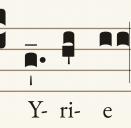 1170 x 1146 - 67KThanked by 1agsmay
 -
Would you care to share a link, or a url?
-
https://scriptoriumchantengraver.com/
The url is in the post but it's hard to see. Here it is as a hyperlink and I'll edit the initial post to have it that way too. -
lmassery, you can add new notes by selecting the text of the music and pressing enter or by selecting a note that is already there and pressing enter or by using the auto-detect syllables button in the Edit text window.
Also, I've already been able to push out an update to address some of the issues MatthewRoth pointed out. I hope to address all of them as soon as possible. -
wonderful
-
I'm as flumoxed as Imassery: "text of the music" could mean notes (which are not "already there") or lyric text (which doesn't seem to avail one either). OK, I get a little further by randomly clicking "Auto-detect syllables" (which changed "If an-y-one would" to "If an-yone wo-uld") and find single notes added, with options to toggle between punctum and shapes on the menu bar, and to add note before and after the selected note. If I try to fix the hyphens these become greyed out…
-
Thank you everyone for your feedback so far, I've been able to push out quite a few updates so far based on feature requests and bug reports. Scriptorium is now more aligned with Gregorio. I want to be clear, I don't intend to replace Gregorio, I simply want to provide an online tool that makes quick engraving easy and painless. Please continue to point out misallignments and I can make the two programs seamless. Users now have better control over automatic syllable detection(more to come). Neumes can be centred over the whole syllable or the first letter, as Gregorio also allows, instead of the vowel. Fixed the ictus, which could be added but not taken off again. Escape now closes the Help and Feedback boxes. A narrow window scrolls sideways to the edge of the sheet instead of cutting it off, and the sheet uses the full width before it does. A .gabc file can be dropped straight onto the page to open it in a new tab. The play button has a small menu for speed and pitch.
Richard Mix, I've added a Latin English toggle to help address your issues. Could you be more descriptive with your feedback, how would you like to be able to interact with the program to do what you're trying to do? The more specific you can be, the more useful it is to me. I am biased because I built the program so I know where all the tools are and how they work, I need your help to be able to understand what's actually not so obvious and how things could be better.Thanked by 1tomjaw -
+1 English toggle. Now I will use it at least once a month (for the Mag antiphon at our DW:DO Evensong). Liking it.
-
Easier than Gregorio has a long way to go still, but as you say it's only a beginning.
1. Why am I prompted to add hyphens in the first place, which will be overriden by a Latin or English rules? What If I'm doing something in Spanish?
2. Figuring out what next after entering text is a matter of trial and error.
3. Sometimes the cursor moves the note up, and sometimes not.
4. Added notes don't display when I use less than the full screen width.
5. Highlighting during playback is out of sync.
There are two features missing from Gregorio that would make me switch:
1. Multiple verses under a single hymn melody
2. Plicas. -
one thing I'm running into is it won't let me separate certain syllables in English notation... Even though I put hyphens/ adding them where they don't exist eg. A-nd
-
Thank you again for all the awesome feedback, I've been averaging an updated program every day which is great! It seems like what people want most is GABC compatibility with Gregorio so keep telling me what I'm missing.
Remember, the more descriptive you can be the better! Something like "Inserting text would be easier if there was a button called [x] which did [x]." is way more helpful for me than "Inserting text is difficult."
To address a few of the comments here:
While you can move notes by clicking and dragging, I highly suggest using the arrow keys on your keyboard.
There is already a feature for multiple verses under a single hymn melody, scroll down in the edit text side panel and click the verse tool button. This tool is even more under development than the rest of this website so as always suggestions are welcome!
I may be able to accommodate your other feature request but I want to be sure we are talking about the same thing, can you please include a picture example of what you mean by Plicas?
There is no typeface. The neumes aren't a font at all: they're SVG outlines embedded in exsurge, drawn as vector paths. If you're trying to match something Gregorio's fonts they are Greciliae, Grana Padano, and Gregorio.
I couldn't reproduce the narrow width bug. With all three panels open the added note is in the drawing and the sheet already scales to fit its container. Was the note is missing entirely or just not where expected? It may be the same clipping issue as the earlier report and simply not fixed thoroughly enough.
I'll look into making a video tutorial, in the meantime is the information under the "Help" button useful?
Also, someone left feedback through the website suggesting that Scriptorium be added next to the other online engravers on GregoBase but I'm not sure how to contact their website admin, does anyone here know how? -
It would be very helpful to have an easier way than gabc for flat notes... It always takes me a long time to figure it out when there are more than one note connected


Welcome to the MusicaSacra Forum!
To participate in the discussions on Catholic church music, sign in or register as a forum member, The forum is a project of the Church Music Association of America.
Categories
- All Discussions21,851
- General Music Discussion8,551
- Job Openings293
- Management of Music Programs862
- Choral Matters539
- Church Documents and Rubrics540
- CMAA Notes307
- Events762
- For Newcomers: Read First26
- Sacred Polyphony567
- Hymnody898
- Gregorian Chant: General2,749
- ↳ Graduale Romanum and Liber Usualis372
- ↳ Graduale Simplex61
- ↳ Semiology65
- Vernacular Plainsong704
- Anglican Use and Anglican Chant73
- Organ, Other Instruments and Repertoire452
- New Composition/Works in Progress1,342
- Recordings238
- Music for Hispanic Ministry163
- Music Education: Children217
- Music Education: General223
- News Items247
- Positions Wanted3
- General Discussion: Catholicism742
- Amusements185
- General Discussion1,049
- Opinions119